|
|

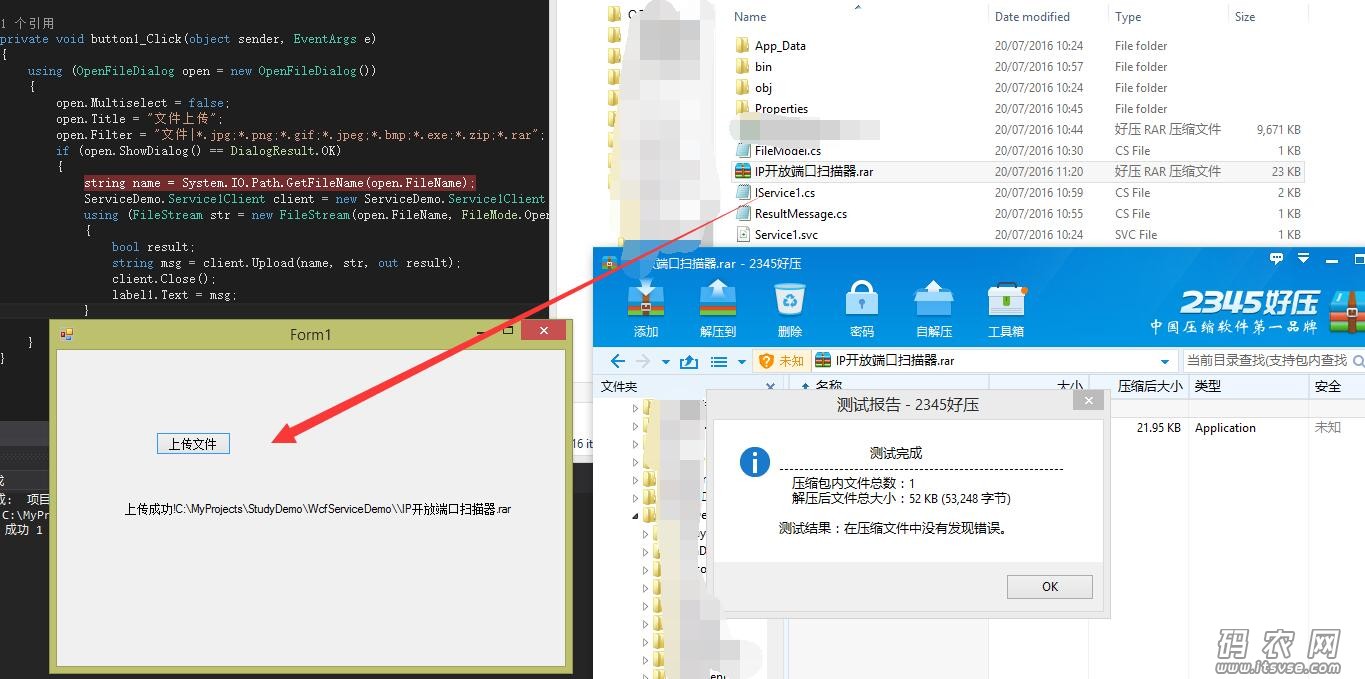
项目,利用wcf实现文件上传,并且返回上传的结果,测试了一个30M的大文件,也能上传成功。
客户端主要代码:
- using System;
- using System.Collections.Generic;
- using System.ComponentModel;
- using System.Data;
- using System.Drawing;
- using System.Linq;
- using System.Text;
- using System.IO;
- using System.Windows.Forms;
- namespace WCFclient
- {
- public partial class Form1 : Form
- {
- public Form1()
- {
- InitializeComponent();
- }
- private void button1_Click(object sender, EventArgs e)
- {
- using (OpenFileDialog open = new OpenFileDialog())
- {
- open.Multiselect = false;
- open.Title = "文件上传";
- open.Filter = "文件|*.jpg;*.png;*.gif;*.jpeg;*.bmp;*.exe;*.zip;*.rar";
- if (open.ShowDialog() == DialogResult.OK)
- {
- string name = System.IO.Path.GetFileName(open.FileName);
- ServiceDemo.Service1Client client = new ServiceDemo.Service1Client();
- using (FileStream str = new FileStream(open.FileName, FileMode.Open, FileAccess.Read))
- {
- bool result;
- string msg = client.Upload(name, str, out result);
- client.Close();
- label1.Text = msg;
- }
- }
- }
- }
- }
- }
WCF服务主要代码:
- using System;
- using System.Collections.Generic;
- using System.Linq;
- using System.Runtime.Serialization;
- using System.ServiceModel;
- using System.ServiceModel.Web;
- using System.Text;
- using System.IO;
- namespace WcfServiceDemo
- {
- // 注意: 使用“重构”菜单上的“重命名”命令,可以同时更改代码、svc 和配置文件中的类名“Service1”。
- // 注意: 为了启动 WCF 测试客户端以测试此服务,请在解决方案资源管理器中选择 Service1.svc 或 Service1.svc.cs,然后开始调试。
- public class Service1 : IService1
- {
- public string GetData(int value)
- {
- return string.Format("You entered: {0}", value);
- }
- public CompositeType GetDataUsingDataContract(CompositeType composite)
- {
- if (composite == null)
- {
- throw new ArgumentNullException("composite");
- }
- if (composite.BoolValue)
- {
- composite.StringValue += "Suffix";
- }
- return composite;
- }
- public ResultMessage Upload(FileModel file)
- {
- if (file.Name == null || file.stream == null)
- {
- ResultMessage msg = new ResultMessage() { ErrorMessage = "上传失败!", IsSuccessed = false };
- return msg;
- }
- string path = AppDomain.CurrentDomain.BaseDirectory + @"" + file.Name;
- #region 接受文件方法1
- try
- {
- using (FileStream outputStream = new FileStream(path, FileMode.OpenOrCreate, FileAccess.Write))
- {
- // 我们不用对两个流对象进行读写,只要复制流就OK
- file.stream.CopyTo(outputStream);
- outputStream.Flush();
- ResultMessage msg = new ResultMessage() { ErrorMessage = "上传成功!" + path, IsSuccessed = true };
- return msg;
- }
- }
- catch (Exception ex)
- {
- ResultMessage msg = new ResultMessage() { ErrorMessage = "上传失败!" + ex.Message, IsSuccessed = false };
- return msg;
- }
- #endregion
-
- #region 接受文件方法2
- FileStream fs = new FileStream(path, FileMode.OpenOrCreate);
- try
- {
- BinaryReader reader = new BinaryReader(file.stream);
- byte[] buffer;
- BinaryWriter writer = new BinaryWriter(fs);
- long offset = fs.Length;
- writer.Seek((int)offset, SeekOrigin.Begin);
- do
- {
- buffer = reader.ReadBytes(1024);
- writer.Write(buffer);
- } while (buffer.Length > 0);
- fs.Close();
- file.stream.Close();
- ResultMessage msg = new ResultMessage() { ErrorMessage = "上传成功!" + path, IsSuccessed = true };
- return msg;
- }
- catch (Exception e)
- {
- ResultMessage msg = new ResultMessage() { ErrorMessage = "上传失败!" + e.Message, IsSuccessed = false };
- return msg;
- }
- finally
- {
- fs.Close();
- file.stream.Close();
- }
- #endregion
-
- }
- }
- }
客户端和服务端代码demo下载:
|
上一篇:The operation 'xxx' could not be loaded because it has a parameter or retu...下一篇:There was no endpoint listening at http://localhost:111/xxx.svc that c...
|
 |小黑屋|架构师
( 鲁ICP备14021824号-2 )|网站地图
|小黑屋|架构师
( 鲁ICP备14021824号-2 )|网站地图

 发表于 2016-7-20 11:36:54
 发表于 2017-11-8 20:46:20

 哈哈,我看看先