架构师_程序员_码农网

 找回密码
 注册[Register]

QQ登录

只需一步,快速开始

搜索
查看: 25431|回复: 2

[资料] c#根据坐标截取一张图片的指定部分

[复制链接]
发表于 2016-1-19 16:50:44 | 显示全部楼层 |阅读模式
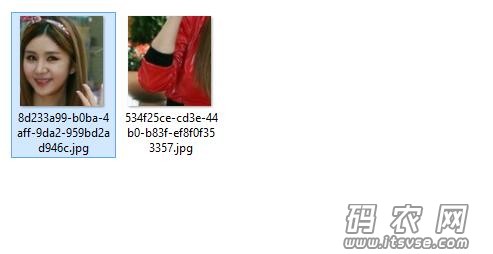
QQ截图20160119164943.jpg

这个是效果图,根绝x y w h来截图原图片

  1. /// <summary>
  2.         /// 截取一张图片的指定部分
  3.         /// </summary>
  4.         /// <param name="bitmapPathAndName">原始图片路径名称</param>
  5.         /// <param name="width">截取图片的宽度</param>
  6.         /// <param name="height">截取图片的高度</param>
  7.         /// <param name="offsetX">开始截取图片的X坐标</param>
  8.         /// <param name="offsetY">开始截取图片的Y坐标</param>
  9.         /// <returns></returns>
  10.         public static Bitmap GetPartOfImageRec(Bitmap sourceBitmap, int width, int height, int offsetX, int offsetY)
  11.         {
  12.             //Bitmap sourceBitmap = new Bitmap(bitmapPathAndName);
  13.             Bitmap resultBitmap = new Bitmap(width, height);
  14.             using (Graphics g = Graphics.FromImage(resultBitmap))
  15.             {
  16.                 Rectangle resultRectangle = new Rectangle(0, 0, width, height);
  17.                 Rectangle sourceRectangle = new Rectangle(0 + offsetX, 0 + offsetY, width, height);
  18.                 g.DrawImage(sourceBitmap, resultRectangle, sourceRectangle, GraphicsUnit.Pixel);
  19.             }
  20.             return resultBitmap;
  21.         }
复制代码


上一篇:财付通企业接口怎么样?财付通接口好不好
下一篇:你们见过360搜索先收录网站内页的吗?
码农网,只发表在实践过程中,遇到的技术难题,不误导他人。
 楼主| 发表于 2016-1-19 17:43:50 | 显示全部楼层
  1. public Bitmap GetPartOfImage(string bitmapPahtAndName, int width, int height, int offsetX, int offsetY)
  2.         {
  3.             Bitmap sourceBitmap = new Bitmap(bitmapPahtAndName);
  4.             Bitmap resultBitmap = new Bitmap(width, height);
  5.             for (int x = 0; x < width; x++)
  6.             {
  7.                 for (int y = 0; y < height; y++)
  8.                 {
  9.                     if (offsetX + x < sourceBitmap.Size.Width & offsetY + y < sourceBitmap.Size.Height)
  10.                     {
  11.                         resultBitmap.SetPixel(x, y, sourceBitmap.GetPixel(offsetX + x, offsetY + y));
  12.                     }
  13.                 }
  14.             }
  15.             return resultBitmap;
  16.         }
复制代码


码农网,只发表在实践过程中,遇到的技术难题,不误导他人。
发表于 2016-1-25 14:53:55 | 显示全部楼层
  1. /// <summary>
  2.         /// 图片缩放
  3.         /// </summary>
  4.         /// <param name="bmp"></param>
  5.         /// <param name="newW"></param>
  6.         /// <param name="newH"></param>
  7.         /// <param name="Mode"></param>
  8.         /// <returns></returns>
  9.         public static Bitmap KiResizeImage(Bitmap bmp,double Mode)
  10.         {
  11.             try
  12.             {
  13.                 //Math.Ceiling
  14.                 var newWw =Convert.ToInt32(Math.Ceiling(bmp.Width * Mode));
  15.                 var newHh = Convert.ToInt32(Math.Ceiling(bmp.Height * Mode));
  16.                 Bitmap b = new Bitmap(newWw, newHh);
  17.                 Graphics g = Graphics.FromImage(b);
  18.                 // 插值算法的质量
  19.                 g.InterpolationMode = InterpolationMode.HighQualityBicubic;
  20.                 g.DrawImage(bmp, new Rectangle(0, 0, newWw, newHh), new Rectangle(0, 0, bmp.Width, bmp.Height), GraphicsUnit.Pixel);
  21.                 g.Dispose();
  22.                 return b;
  23.             }
  24.             catch
  25.             {
  26.                 return null;
  27.             }
  28.         }
复制代码


图片缩小和放大
码农网,只发表在实践过程中,遇到的技术难题,不误导他人。
您需要登录后才可以回帖 登录 | 注册[Register]

本版积分规则

免责声明:
码农网所发布的一切软件、编程资料或者文章仅限用于学习和研究目的;不得将上述内容用于商业或者非法用途,否则,一切后果请用户自负。本站信息来自网络,版权争议与本站无关。您必须在下载后的24个小时之内,从您的电脑中彻底删除上述内容。如果您喜欢该程序,请支持正版软件,购买注册,得到更好的正版服务。如有侵权请邮件与我们联系处理。

Mail To:help@itsvse.com

QQ|小黑屋|架构师 ( 鲁ICP备14021824号-2 )|网站地图

GMT+8, 2026-2-19 11:25

Powered by Discuz! X3.4

Copyright © 2001-2021, Tencent Cloud.

快速回复 返回顶部 返回列表

