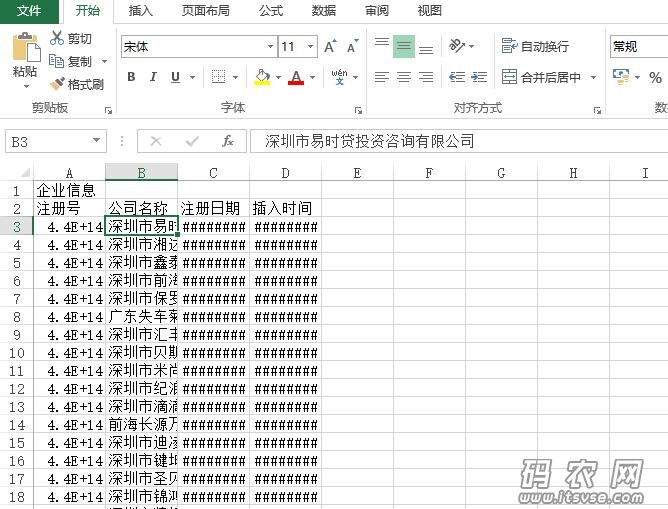
导出结果如上图:
- /// <summary>
- /// 导出报表为Csv
- /// </summary>
- /// <param name="dt">DataTable</param>
- /// <param name="strFilePath">物理路径</param>
- /// <param name="tableheader">表头</param>
- /// <param name="columname">字段标题,逗号分隔</param>
- public static bool dt2csv(DataTable dt, string strFilePath, string tableheader, string columname)
- {
- try
- {
- string strBufferLine = "";
- StreamWriter strmWriterObj = new StreamWriter(strFilePath, false, System.Text.Encoding.UTF8);
- strmWriterObj.WriteLine(tableheader);
- strmWriterObj.WriteLine(columname);
- for (int i = 0; i < dt.Rows.Count; i++)
- {
- strBufferLine = "";
- for (int j = 0; j < dt.Columns.Count; j++)
- {
- if (j > 0)
- strBufferLine += ",";
- strBufferLine += dt.Rows[i][j].ToString();
- }
- strmWriterObj.WriteLine(strBufferLine);
- }
- strmWriterObj.Close();
- return true;
- }
- catch
- {
- return false;
- }
- }
大家可能会用到List转DataTable的方法,附上:
- /// <summary>
- /// List转DataTable
- /// </summary>
- /// <typeparam name="T"></typeparam>
- /// <param name="collection"></param>
- /// <returns></returns>
- public static DataTable ToDataTable<T>(IEnumerable<T> collection)
- {
- var props = typeof(T).GetProperties();
- var dt = new DataTable();
- dt.Columns.AddRange(props.Select(p => new DataColumn(p.Name, p.PropertyType)).ToArray());
- if (collection.Count() > 0)
- {
- for (int i = 0; i < collection.Count(); i++)
- {
- ArrayList tempList = new ArrayList();
- foreach (PropertyInfo pi in props)
- {
- object obj = pi.GetValue(collection.ElementAt(i), null);
- tempList.Add(obj);
- }
- object[] array = tempList.ToArray();
- dt.LoadDataRow(array, true);
- }
- }
- return dt;
- }
调用的代码:
- string file_path = AppDomain.CurrentDomain.BaseDirectory + @"" + Guid.NewGuid().ToString() + ".csv";
- DataTable dt = ToDataTable<Enterprise>(LIST_ENTERPRISE);
- if (dt2csv(dt, file_path, "企业信息", "注册号,公司名称,注册日期,插入时间"))
- {
- MessageBox.Show("导出成功,文件位置:" + file_path);
- }
- else {
- MessageBox.Show("导出失败,未知错误");
- }
|

 |小黑屋|架构师
( 鲁ICP备14021824号-2 )|网站地图
|小黑屋|架构师
( 鲁ICP备14021824号-2 )|网站地图

 发表于 2016-10-7 16:11:21