架构师_程序员_码农网

 找回密码
 注册[Register]

QQ登录

只需一步,快速开始

搜索
查看: 21397|回复: 4

[WinForm] c# 抓取网页的img src带参数的图片链接,并下载

[复制链接]
发表于 2016-4-29 15:29:14 | 显示全部楼层 |阅读模式
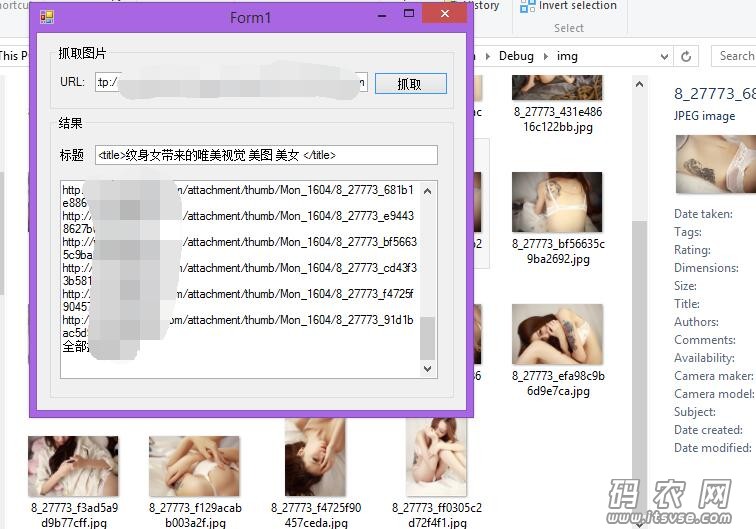
QQ截图20160429152834.jpg

  1. using System;
  2. using System.Collections.Generic;
  3. using System.ComponentModel;
  4. using System.Data;
  5. using System.Drawing;
  6. using System.IO;
  7. using System.Linq;
  8. using System.Net;
  9. using System.Text;
  10. using System.Text.RegularExpressions;
  11. using System.Threading;
  12. using System.Windows.Forms;

  13. namespace ImageCollection
  14. {
  15.     public partial class Form1 : Form
  16.     {
  17.         private static string Path = AppDomain.CurrentDomain.BaseDirectory + "img";
  18.         public Form1()
  19.         {
  20.             InitializeComponent();
  21.         }

  22.         private void btnshuaqu_Click(object sender, EventArgs e)
  23.         {
  24.             string url = txturl.Text.Trim();
  25.             if (string.IsNullOrEmpty(url))
  26.             {
  27.                 MessageBox.Show("请输入URl");
  28.                 return;
  29.             }
  30.             txtimg.AppendText("开始抓取中:\r\n");
  31.             Thread th = new Thread(() => ShuaQu(url)) { IsBackground = true };
  32.             th.Start();
  33.         }

  34.         private void ShuaQu(string url)
  35.         {
  36.             DirectoryInfo di = new DirectoryInfo(Path);
  37.             if (System.IO.Directory.Exists(Path))
  38.             {
  39.                 di.Delete(true);
  40.             }
  41.             System.IO.Directory.CreateDirectory(Path);
  42.             string result = WebHttp.HttpGet(url, null, 3);
  43.             string[] str = GetHtmlImageUrlList(result);
  44.             txtimg.Invoke(new Action(() =>
  45.             {
  46.                 txtimg.AppendText("已经获取到数据!"+str.Count() + "\r\n");
  47.             }));
  48.             //建立获取网页标题正则表达式  
  49.             String regex = @"<title>.+</title>";

  50.             //返回网页标题  
  51.             String title = Regex.Match(result, regex).ToString();
  52.             txttitle.Invoke(new Action(() => {
  53.                 txttitle.Text = Regex.Replace(title, @"[""]+", "");
  54.             }));
  55.             foreach (string s in str)
  56.             {
  57.                 Uri u = new Uri(s);
  58.                 if (u.Host == "www.xxx.com")
  59.                 {
  60.                     Thread downimg = new Thread(() => Get_img(s)) { IsBackground = true };
  61.                     downimg.Start();
  62.                     txtimg.Invoke(new Action(() => {
  63.                         txtimg.AppendText(s + "\r\n");
  64.                     }));
  65.                 }
  66.             }
  67.             txtimg.Invoke(new Action(() =>
  68.             {
  69.                 txtimg.AppendText("全部抓取完成!\r\n");
  70.             }));
  71.         }

  72.         public void Get_img(string imgpath)
  73.         {
  74.             

  75.             string[] file = imgpath.Split('?');
  76.             string name = System.IO.Path.GetFileName(file[0]);
  77.             WebClient mywebclient = new WebClient();
  78.             mywebclient.DownloadFile(imgpath, Path + @"" + name);
  79.             //Bitmap img = null;
  80.             //HttpWebRequest req;
  81.             //HttpWebResponse res = null;
  82.             //try
  83.             //{
  84.             //    System.Uri httpUrl = new System.Uri(imgpath);
  85.             //    req = (HttpWebRequest)(WebRequest.Create(httpUrl));
  86.             //    req.Timeout = 180000; //设置超时值10秒
  87.             //    req.UserAgent = "XXXXX";
  88.             //    req.Accept = "XXXXXX";
  89.             //    req.Method = "GET";
  90.             //    res = (HttpWebResponse)(req.GetResponse());
  91.             //    img = new Bitmap(res.GetResponseStream());//获取图片流               
  92.             //    img.Save(Path + @""+name);//随机名
  93.             //}

  94.             //catch (Exception ex)
  95.             //{
  96.             //    string aa = ex.Message;
  97.             //}
  98.             //finally
  99.             //{
  100.             //    res.Close();
  101.             //}
  102.         }


  103.         /// <summary>
  104.         /// 取得HTML中所有图片的 URL。
  105.         /// </summary>
  106.         /// <param name="sHtmlText">HTML代码</param>
  107.         /// <returns>图片的URL列表</returns>
  108.         private string[] GetHtmlImageUrlList(string sHtmlText)
  109.         {
  110.             // 定义正则表达式用来匹配 img 标签
  111.             Regex regImg = new Regex(@"<img\b[^<>]*?\bsrc[\s\t\r\n]*=[\s\t\r\n]*[""']?[\s\t\r\n]*(?<imgUrl>[^\s\t\r\n""'<>]*)[^<>]*?/?[\s\t\r\n]*>", RegexOptions.IgnoreCase);

  112.             // 搜索匹配的字符串
  113.             MatchCollection matches = regImg.Matches(sHtmlText);
  114.             int i = 0;
  115.             string[] sUrlList = new string[matches.Count];

  116.             // 取得匹配项列表
  117.             foreach (Match match in matches)
  118.                 sUrlList[i++] = match.Groups["imgUrl"].Value;
  119.             return sUrlList;
  120.         }
  121.     }
  122. }
复制代码


上一篇:asp.net 获取jquery datatables传到后台的参数
下一篇:C# 动态加载Dll接口
码农网,只发表在实践过程中,遇到的技术难题,不误导他人。
 楼主| 发表于 2016-5-3 18:29:17 | 显示全部楼层
显示下载所有图片成功的时候,可能并没有下载成功,因为,下载线程在进行,网速慢的话,可能会等一段时间
码农网,只发表在实践过程中,遇到的技术难题,不误导他人。
 楼主| 发表于 2016-5-16 18:35:11 | 显示全部楼层
下载图片,也可以这样做


码农网,只发表在实践过程中,遇到的技术难题,不误导他人。
发表于 2016-5-19 14:37:27 | 显示全部楼层
美图~~
码农网,只发表在实践过程中,遇到的技术难题,不误导他人。
 楼主| 发表于 2016-5-19 15:31:56 | 显示全部楼层

哈哈  是啊   都是美女图片
码农网,只发表在实践过程中,遇到的技术难题,不误导他人。
您需要登录后才可以回帖 登录 | 注册[Register]

本版积分规则

免责声明:
码农网所发布的一切软件、编程资料或者文章仅限用于学习和研究目的;不得将上述内容用于商业或者非法用途,否则,一切后果请用户自负。本站信息来自网络,版权争议与本站无关。您必须在下载后的24个小时之内,从您的电脑中彻底删除上述内容。如果您喜欢该程序,请支持正版软件,购买注册,得到更好的正版服务。如有侵权请邮件与我们联系处理。

Mail To:help@itsvse.com

QQ|小黑屋|架构师 ( 鲁ICP备14021824号-2 )|网站地图

GMT+8, 2026-5-9 16:59

Powered by Discuz! X3.4

Copyright © 2001-2021, Tencent Cloud.

快速回复 返回顶部 返回列表