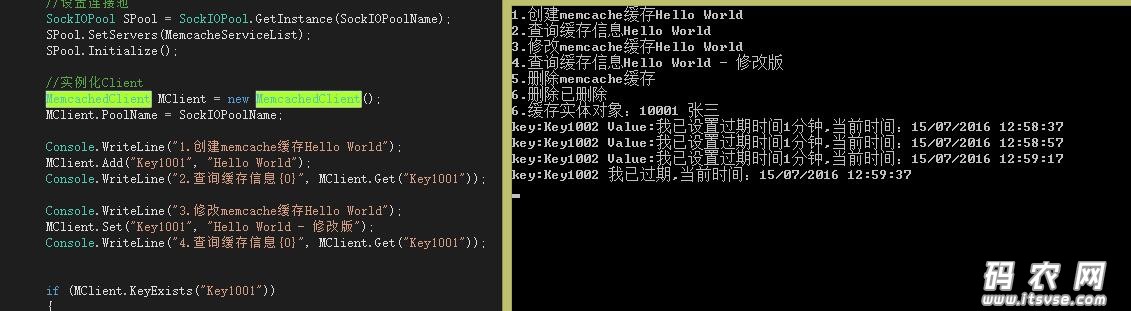
- using System;
- using System.Collections.Generic;
- using System.Linq;
- using System.Text;
- using Memcached.ClientLibrary;
- using System.Threading;
- namespace ConsoleApplication1
- {
- [Serializable]
- public class Student
- {
- public string id { get; set; }
- public string name { get; set; }
-
- }
- class Program
- {
- [STAThread]
- static void Main(string[] args)
- {
- //参数设置
- string SockIOPoolName = "itsvse_memchached";
- string[] MemcacheServiceList = { "10.0.0.215:1998" };
- //设置连接池
- SockIOPool SPool = SockIOPool.GetInstance(SockIOPoolName);
- SPool.SetServers(MemcacheServiceList);
- SPool.Initialize();
- //实例化Client
- MemcachedClient MClient = new MemcachedClient();
- MClient.PoolName = SockIOPoolName;
- Console.WriteLine("1.创建memcache缓存Hello World");
- MClient.Add("Key1001", "Hello World");
- Console.WriteLine("2.查询缓存信息{0}", MClient.Get("Key1001"));
- Console.WriteLine("3.修改memcache缓存Hello World");
- MClient.Set("Key1001", "Hello World - 修改版");
- Console.WriteLine("4.查询缓存信息{0}", MClient.Get("Key1001"));
- if (MClient.KeyExists("Key1001"))
- {
- Console.WriteLine("5.删除memcache缓存");
- MClient.Delete("Key1001");
- }
- if (MClient.KeyExists("Key1001"))
- Console.WriteLine(MClient.Get("Key1001"));
- else
- Console.WriteLine("6.删除已删除");
- Student stud = new Student() { id = "10001", name = "张三" };
- MClient.Add("student", stud,DateTime.Now.AddMinutes(1));
- Student Get_stud = MClient.Get("student") as Student;
- Console.WriteLine("6.缓存实体对象:{0} {1}", Get_stud.id, Get_stud.name);
- MClient.Add("Key1002", "我已设置过期时间1分钟", DateTime.Now.AddMinutes(1));
- while (true)
- {
- if (MClient.KeyExists("Key1002"))
- {
- Console.WriteLine("key:Key1002 Value:{0},当前时间:{1}", MClient.Get("Key1002"), DateTime.Now);
- Thread.Sleep(20000);
- }
- else
- {
- Console.WriteLine("key:Key1002 我已过期,当前时间:{0}", DateTime.Now);
- break;
- }
- }
- }
- }
- }
demo下载:
|

 |小黑屋|架构师
( 鲁ICP备14021824号-2 )|网站地图
|小黑屋|架构师
( 鲁ICP备14021824号-2 )|网站地图

 发表于 2016-7-15 13:04:32