今天早上被同事问了一个问题:说接收到的参数是乱码,让我帮着解决一下。
同事负责的平台是Ext.js框架搭建的,web.config配置文件里配置了全局为“GB2312”编码:
<globalization requestEncoding="gb2312" responseEncoding="gb2312" fileEncoding="gb2312" culture="zh-CN"/>
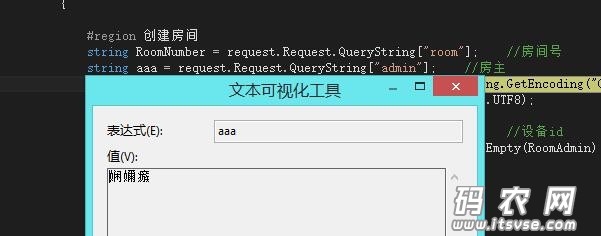
当前台提交“中文文字”时,后台用Request.QueryString["xxx"]接收到的是乱码。
无论用System.Web.HttpUtility.UrlDecode("xxx","编码类型")怎么解码都无效。
原理说明: 1:首先确定的是:客户端的url参数在提交时,Ext.js会对其编码再提交,而客户端的编码默认是utf-8编码
2:那为什么用Request.QueryString["xxx"]接收参数时,收到的会是乱码?
我们步步反编绎, 2.1:看QueryString属性的代码:
- Code highlighting produced by Actipro CodeHighlighter (freeware)http://www.CodeHighlighter.com/-->public NameValueCollection QueryString
- {
- get
- {
- if (this._queryString == null)
- {
- this._queryString = new HttpValueCollection();
- if (this._wr != null)
- {
- this.FillInQueryStringCollection();//重点代码切入点
- }
- this._queryString.MakeReadOnly();
- }
- if (this._flags[1])
- {
- this._flags.Clear(1);
- ValidateNameValueCollection(this._queryString, "Request.QueryString");
- }
- return this._queryString;
- }
- }
2.2:切入 FillInQueryStringCollection()方法
- Code highlighting produced by Actipro CodeHighlighter (freeware)http://www.CodeHighlighter.com/-->private void FillInQueryStringCollection()
- {
- byte[] queryStringBytes = this.QueryStringBytes;
- if (queryStringBytes != null)
- {
- if (queryStringBytes.Length != 0)
- {
- this._queryString.FillFromEncodedBytes(queryStringBytes, this.QueryStringEncoding);
- }
- }//上面是对流字节的处理,即文件上传之类的。
- else if (!string.IsNullOrEmpty(this.QueryStringText))
- {
- //下面这句是对普通文件提交的处理:FillFromString是个切入点,编码切入点是:this.QueryStringEncoding
- this._queryString.FillFromString(this.QueryStringText, true, this.QueryStringEncoding);
-
- }
- }
2.3:切入:QueryStringEncoding
- Code highlighting produced by Actipro CodeHighlighter (freeware)http://www.CodeHighlighter.com/-->internal Encoding QueryStringEncoding
- {
- get
- {
- Encoding contentEncoding = this.ContentEncoding;
- if (!contentEncoding.Equals(Encoding.Unicode))
- {
- return contentEncoding;
- }
- return Encoding.UTF8;
- }
- }
- //点击进入this.ContentEncoding则为:
- public Encoding ContentEncoding
- {
- get
- {
- if (!this._flags[0x20] || (this._encoding == null))
- {
- this._encoding = this.GetEncodingFromHeaders();
- if (this._encoding == null)
- {
- GlobalizationSection globalization = RuntimeConfig.GetLKGConfig(this._context).Globalization;
- this._encoding = globalization.RequestEncoding;
- }
- this._flags.Set(0x20);
- }
- return this._encoding;
- }
- set
- {
- this._encoding = value;
- this._flags.Set(0x20);
- }
- }
从QueryStringEncoding代码得出,系统默认会先取globalization配置节点的编码方式,如果取不到,则默认为UTF-8编码方式 2.4:切入 FillFromString(string s, bool urlencoded, Encoding encoding)
- 代码有点长,就折叠起来了
- Code highlighting produced by Actipro CodeHighlighter (freeware)http://www.CodeHighlighter.com/-->internal void FillFromString(string s, bool urlencoded, Encoding encoding)
- {
- int num = (s != null) ? s.Length : 0;
- for (int i = 0; i < num; i++)
- {
- int startIndex = i;
- int num4 = -1;
- while (i < num)
- {
- char ch = s[i];
- if (ch == '=')
- {
- if (num4 < 0)
- {
- num4 = i;
- }
- }
- else if (ch == '&')
- {
- break;
- }
- i++;
- }
- string str = null;
- string str2 = null;
- if (num4 >= 0)
- {
- str = s.Substring(startIndex, num4 - startIndex);
- str2 = s.Substring(num4 + 1, (i - num4) - 1);
- }
- else
- {
- str2 = s.Substring(startIndex, i - startIndex);
- }
- if (urlencoded)//外面的传值默认是true,所以会执行以下语句
- {
- base.Add(HttpUtility.UrlDecode(str, encoding), HttpUtility.UrlDecode(str2, encoding));
- }
- else
- {
- base.Add(str, str2);
- }
- if ((i == (num - 1)) && (s[i] == '&'))
- {
- base.Add(null, string.Empty);
- }
- }
- }
从这点我们发现:所有的参数输入,都调用了一次:HttpUtility.UrlDecode(str2, encoding);
当客户端js对中文以utf-8编码提交到服务端时,用Request.QueryString接收时,会先以globalization配置的gb2312去解码一次,于是,产生了乱码。
1:js编码方式为urt-8
2:服务端又配置了默认为gb2312
3:Request.QueryString默认又会调用HttpUtility.UrlDecode用系统配置编码去解码接收参数。
1:系统取默认编码的顺序为:http请求头->globalization配置节点-》默认UTF-8
2:在Url直接输入中文时,不同浏览器处理方式可能不同如:ie不进行编码直接提交,firefox对url进行gb2312编码后提交。
3:对于未编码“中文字符”,使用Request.QueryString时内部调用HttpUtility.UrlDecode后,由gb2312->utf-8时,
如果查不到该中文字符,默认转成"%ufffd",因此出现不可逆乱码。
4:解决之路 知道了原理,解决的方式也有多种多样了: 1:全局统一为UTF-8编码,省事又省心。
2:全局指定了GB2312编码时,url带中文,js非编码不可,如ext.js框架。
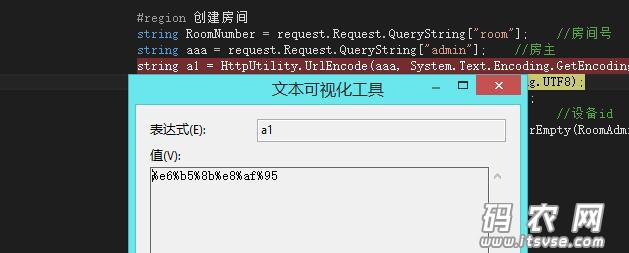
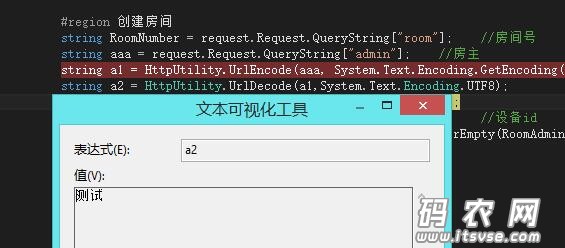
这种方式你只能特殊处理,在服务端指定编码解码, 因为默认系统调用了一次HttpUtility.UrlDecode("xxx",系统配置的编码), 因此你再调用一次HttpUtility.UrlEncode("xxx",系统配置的编码),返回到原始urt-8编码参数
再用HttpUtility.UrlDecode("xxx",utf-8),解码即可。 string aaa = request.Request.QueryString["admin"]; //房主
string a1 = HttpUtility.UrlEncode(aaa, System.Text.Encoding.GetEncoding("GB2312"));
string a2 = HttpUtility.UrlDecode(a1,System.Text.Encoding.UTF8);
| 
 |小黑屋|架构师
( 鲁ICP备14021824号-2 )|网站地图
|小黑屋|架构师
( 鲁ICP备14021824号-2 )|网站地图

 发表于 2015-12-25 18:41:49